Cool CS Bot

A Better Discord Experience
This bot is built to enhance both user experience and server management.
Why create dozens of voice channels when users can make their own (with full privacy controls)
and the bot cleans everything up automatically? And for CS2 players, nothing beats showing off
your Faceit elo or stats, both of which the bot handles with ease!
Plus, you'll never miss a CS2 update again! The bot fetches new patches within minutes and
presents the notes in a clean, easy to read format.
-
Automated Faceit Elo Tracking
Users can enter their Faceit username and have their elo updated every 24 hours.
-
Detailed Faceit Match History
View stats for the last 10 games of any player, including Wins, Losses, average ADR and more!
-
Weekly Faceit Leaderboard
Users can enter themselves into an automatically updated leaderboard where they can flex their current elo, elo gains, elo losses or matches played in the last 7 days!
-
Update Notifications
CS2 updates are fetched within minutes and posted on your server if this feature is activated!
-
Looking-For-Players Feature
No more spamming "someone from REGION wanting to play CS2 together?" in text channels. Users looking for other CS2 players can create a LFP profile allowing others to add them!
-
...and many more!
Additional utilities, QoL tools, and CS inspired features designed to enhance your Discord server.
Faceit Stats, LFP, the Queue and more...
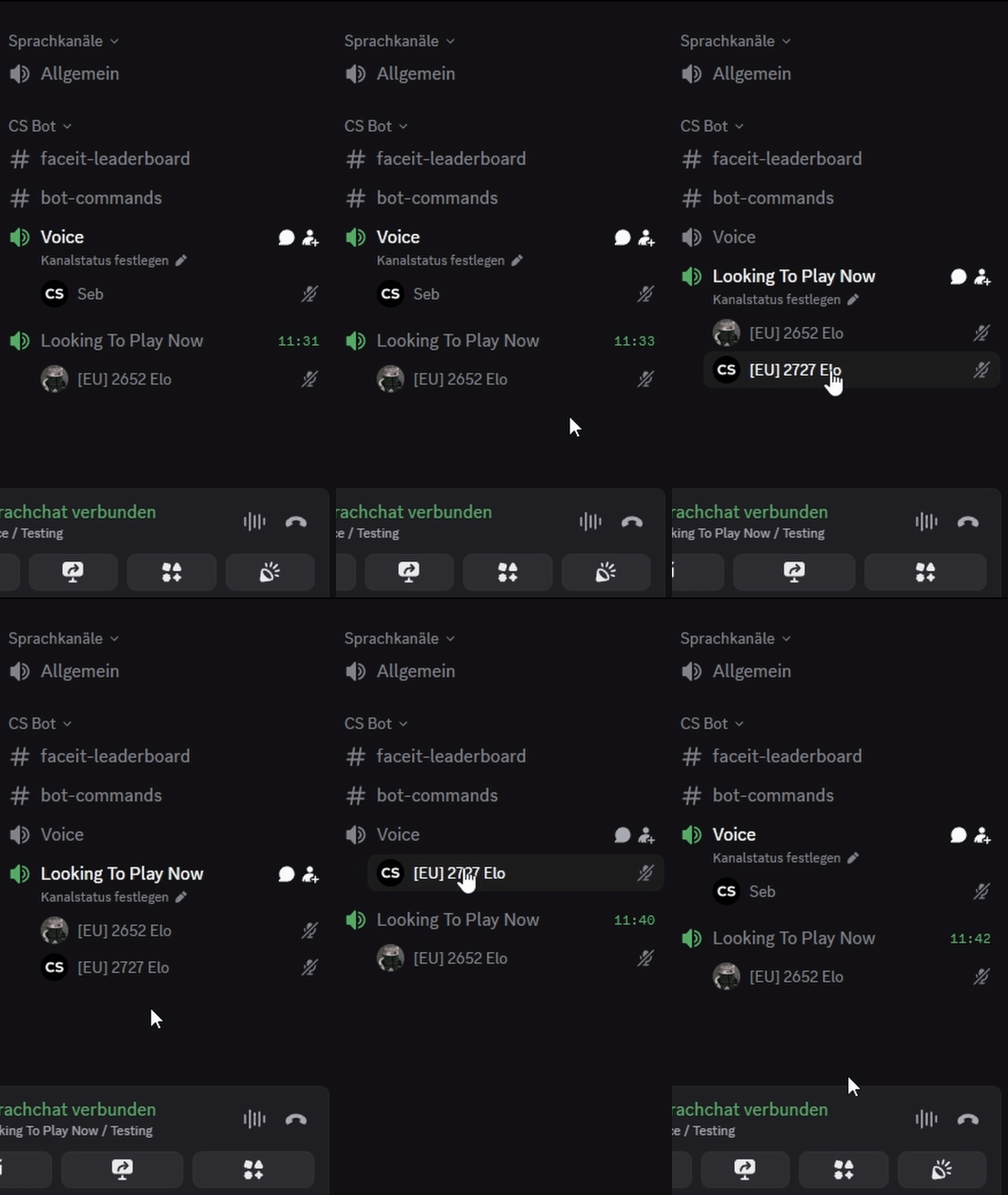
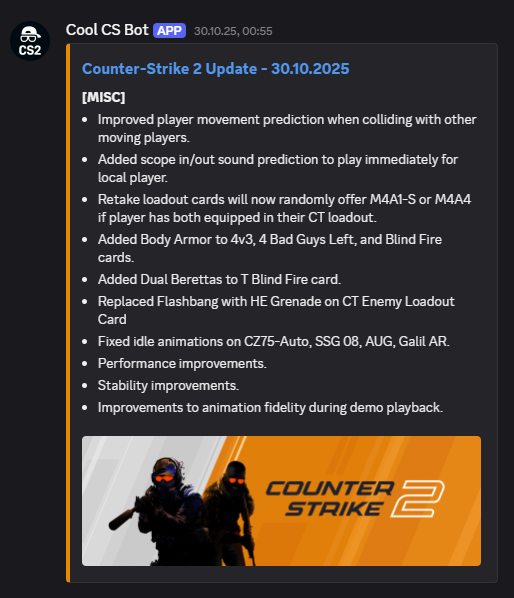
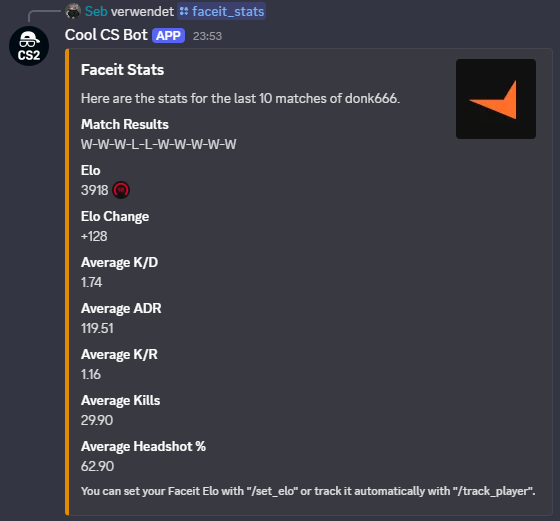

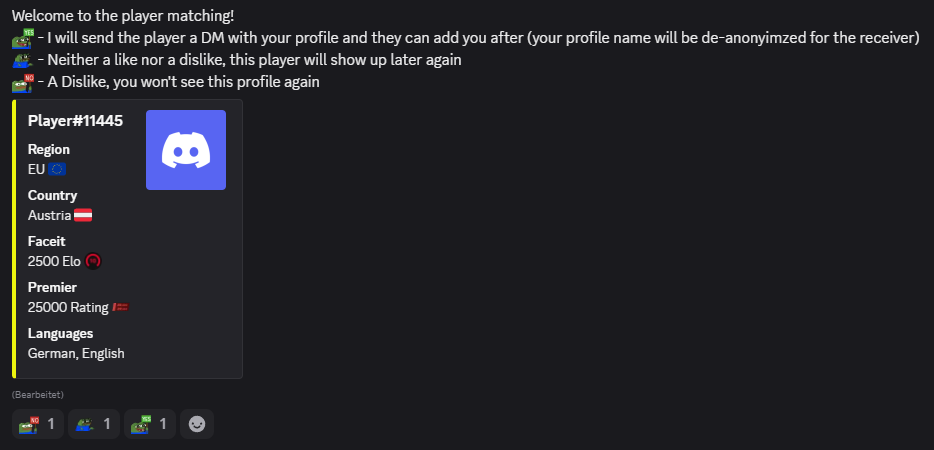
Documentation
Owner Commands
| Command | Parameters | Description |
|---|---|---|
| /server_setup | None | Let the Bot setup the basics on your server. Creates a Bot Category, Region Roles, a Queue Channel and a Bot Commands channel. |
| /server_reset | None | Let the Bot reset your server. Everything you or a user created in terms of channels will be deleted and everything in the database regarding your server will also be wiped. |
| /server_leave | None | Prompts the Bot to reset your server. Everything you or a user created in terms of channels will be deleted and everything in the database regarding your server will also be wiped. The Bot will also leave the server afterwards. |
| /server_premium | None | Activates premium status for your server, if you have a running subscription on Patreon. Note: It can take up to 24 hours until the activation is completed. And yes, it will be valid for 31 days from the moment the activation is completed. |
| /patchnotes_subscribe | None | Subscribes the channel the command was run in to receive notifications from the Bot whenever a CS2 update drops. |
| /patchnotes_unsubscribe | None | Removes your server from receiving CS2 patchnotes. |
| /leaderboard_create | None | Creates a leaderboard users can enter. This leaderboard displays various Faceit stats. If you want to remove the leaderboard, simply delete the created text-channel. |
| /bot_updates_subscribe | None | Subscribes the channel the command was used in to receive development updates of the Bot. This includes mostly planned downtimes or incoming bugfixes. |
| /bot_updates_unsubscribe | None | Removes any set channel for Bot updates from receiving notifications. |
| /ban | discord_name | Bans the user from using any feature of the Bot on your server for 1 year and deletes all associated data
(e.g. Leaderboard entry, LFP profile, etc.). Note: discord_name is the unique profile name of the user (formerly name#1234), not their changable nickname on your server. |
| /unban | discord_name | Lifts the server wide ban from a user and allows them to use the bot again. |
Faceit Commands
| Command | Parameters | Description |
|---|---|---|
| /track_player | faceit_name | Tracks the elo of the entered Faceit Nickname. The elo will be refreshed every 24 hours. |
| /untrack_player | None | Stops tracking the elo of the Faceit Nickname you entered before. |
| /faceit_stats | faceit_name | Displays various stats (e.g. average ADR, K/R, etc.) of the last 10 games played by the entered Faceit Player. |
| /leaderboard_enter | None | Inserts you into the Faceit Leaderboard of a server if one has been created. Note: This command requires you to track your Faceit account using "/track_player". |
| /leaderboard_leave | None | Removes you from the Faceit Leaderboard of a server the next time it is updated. |
Looking For Players Commands
| Command | Parameters | Description |
|---|---|---|
| /lfp_create | None | Sends you a DM that walks you through the provess of creating a LFP profile. Note: Creating a profile is required to match other players. |
| /lfp_update | None | Lets you update/change any value in your LFP profile. |
| /lfp_delete | None | Deletes your LFP profile and assoicated data in the database. Note: This needs to be done on each server where you created a profile. |
| /lfp_extend | None | Extends the duration of your LFP profile by 14 days. Note: After 14 days of inactivity (you not using any /lfp commands), your profile will be automatically deleted. Note: A few days before your profile would get deleted, the Bot sends you a notifications that deletion is imminent. |
| /lfp | None | Lets you look through other LFP profiles on this server. |
Voice Channel Commands
| Command | Parameters | Description |
|---|---|---|
| /voice_create | None | Creates a temporary voice channel. After all users have left, the channel will be deleted. |
| /voice_create_private | None | Creates a temporary voice channel, hidden from other users. The creator can move other people in this channel. After all users have left, the channel will be deleted. |
General User Commands
| Command | Parameters | Description |
|---|---|---|
| /elo_set | faceit_elo premier_rating |
Sets your Faceit Elo and/or your Premier Rating. Note: These values will be used when creating a LFP profile. |
| /elo_show | None | Displays your current set Faceit Elo and Premier Rating. |
| /region | None | Lets you choose your region, which will then be assigned to you as a server role. Note: This is required for creating a LFP profile and the Looking To Play Now feature. |
| /queue_mode | None | Switches between your Faceit Elo or Premier Rating elo being displayed in the Looking To Play Now channel. |
| /delete_data | None | Deletes any and all stored data of your Discord user-id in the database of the bot. Note: If you are on multiple servers using this bot, you only need to run the command once to delete all data entries from all servers. |
| /clutch | situation | Simulates your performance in a 1vX situation. Note: You can improve the odds of a positive roll by setting your Faceit elo. The higher your elo, the higher the chances of a successful clutch! |
| /shuffle | None | Splits all users in a channel into two evenly balanced teams in terms of their Faceit Elo. Note: This feature requires at least two users in a channel and will ignore all users who haven't set their Faceit elo yet. |
Quick Start Guide
-
1. Invite the Bot
Add the bot to your Discord server using the official invite link (Home section).
-
2. Permissions
Assign the Bot the required permissions by right clicking your server icon -> server settings -> roles and move the CS Bot all the way to the top.
-
3. Setup your Server
Use
/server_setupto let the Bot create the basic channels required for some of its commands. You can move them around freely after, as long as they remain in the CS Bot category. -
4. Explore Commands
Take a look at the Documentation section to get an idea of what the Bot is capable of.
-
5. Bonus Tip
Use
/leaderboard_createto create a weekly (or more frequently) updated Leaderboard featuring all kinds of Faceit stats of participating server members over the last 7 days. -
6. Feedback and Issues
If you encounter any issues or the Bot is acting up, you can hit me up here any time :)
Terms of Service
Last Updated: 19.11.2025
These Terms of Service ("Terms") govern your access and use of the Cool CS Bot Discord bot. By using the Bot, you agree to these Terms. If you do not agree, you must not use the Bot.
1. Eligibility
You must meet the minimum age requirements set by Discord’s Terms of Service. By using the Bot, you confirm that you satisfy these requirements.
2. Description of the Service
The Bot offers optional features, including:
- Leaderboards for Faceit related statistics
- Faceit related statistics of past matches and your elo
- Looking For Players (LFP) profiles and profile matching
- Automated CS2 updates and Bot updates
- Enhanced Voice Channel management
All features are provided "as-is" and may be added, removed, or modified at any time.
3. User-Generated Content & User Responsibility
Users may submit information such as Faceit usernames, their region, spoken languages, and other player information. Users are solely responsible for the content they submit and their interactions with others.
The Bot operator is not liable for:
- User behavior, harassment, spam, or abuse
- Accuracy of user-submitted information
- DMs exchanged between users
4. Acceptable Use & Anti-Abuse Policy
Users agree not to:
- Spam commands or automate usage of the Bot
- Exploit, attack, overload, or reverse-engineer the Bot
- Use the Bot for harassment, threats, stalking, or impersonation
- Manipulate leaderboard data or misuse the LFP system
- Bypass rate limits or command restrictions
The operator may restrict or ban users violating these Terms.
5. Data Collection & GDPR Compliance
The Bot collects only data required to operate its features, including:
- Discord User ID
- Faceit username and public stats
- LFP profile fields (region, country, spoken languages)
- Timestamps for updates and participation
Purpose of Storage
Data is used exclusively for Bot features such as, but not limited to, leaderboards, LFP searches, and abuse prevention.
User Rights
Users may request to view, modify, or delete their stored data at any time using provided commands.
Data Retention
LFP related DMs auto-delete after 24 hours. Data is erased once a user opts out (by using the provided commands), a user leaves a server or a user does not actively use the Bot for 30 days. Created LFP profiles are deleted after 14 days of inactivity (not using any LFP features).
Data Protection
Reasonable security measures are applied, but no system guarantees absolute security. Users accept this risk.
6. No Warranty / Service Provided "As Is"
The Bot is provided without any warranties regarding uptime, accuracy, availability, reliability, or error-free operation. Service interruptions may occur.
7. Limitation of Liability
To the fullest extent permitted by law, the Bot operator is not liable for:
- User interactions or misconduct
- Loss, corruption, or exposure of data
- Service downtime, bugs, or errors
- Unauthorized access, hacking, or malicious activity
- Indirect, incidental, or consequential damages
Users interact with the Bot at their own risk.
8. Server-Level Bans
Server owners and administrators have the authority to ban users from using the bot’s features within their server at any time and for any reason in accordance with their own community rules.
Such bans remain active for a period of 1 year, during which the affected user cannot request deletion of the minimal data required to maintain the ban.
For all matters related to how ban-related data is stored and retained please refer to the corresponding section in the Privacy Policy.
9. Right to Modify or Discontinue Service
The operator may update, change, suspend, or discontinue the Bot at any time without notice. Continuation of use after updates implies acceptance of revised Terms.
10. Termination
The operator may restrict or terminate access for any user who violates these Terms. Users may delete their data or stop using the Bot at any time.
11. Governing Law
These Terms are governed by the laws applicable in the operator’s jurisdiction unless overridden by regional legal requirements.
12. Contact
For inquiries contact: sebcs.cs2@gmail.com
Privacy Policy
This Privacy Policy explains what data the Bot collects, why it is collected, how long it is stored, and how users may request deletion. By using the Bot, you consent to the processing of the data described below for the purposes outlined.
1. Data Controller
The Data Controller for all processing carried out by the Bot is the Bot’s developer/owner. Contact information is provided at the bottom of the Terms Of Service.
2. Data Collected Automatically
2.1 Guild Information
- Guild ID
- User ID of the server owner
Purpose: Required for bot functionality, command handling, and server-specific configuration.
Retention: Until the Bot is kicked, banned, or manually prompted to leave the server.
2.2 Dynamic Voice Channel System
Temporary Channels
- Guild ID
- Voice Channel ID
- Host User ID (first user joining an empty channel)
Purpose: Managing dynamic voice channel ownership and lifecycle.
Retention:
• Host User ID is deleted as soon as the user leaves the channel.
• Channel data is deleted as soon as the channel becomes empty.
3. Patchnote Notification System
- Guild ID
- Channel ID
Purpose: Sending CS2 update notifications and Bot update messages.
Retention: Until a server admin unsubscribes from notifications using the according command.
4. Premium Server Data
- Guild ID
- Premium tier information
- Date until Premium is valid
Purpose: Determine premium feature access.
Retention: Until the premium period ends.
5. User-Provided Data (Faceit & CS2 Statistics)
- Faceit Elo
- Premier Rating
- Faceit Nickname
- Region
Purpose: Enable leaderboard features and personalized statistics.
Retention:
• Until the user deletes their data via /delete_data, OR
• After 30 days of inactivity (no activity on any server where the Bot is a member).
6. Player Profile (LFP System)
For the Looking-For-Players system, the following data is stored:
- User ID
- Region
- Country
- Primary and Secondary Languages
Purpose: Allow players to create searchable profiles to find potential teammates.
6.1 Data Visibility
Search results anonymize usernames (e.g. "Player#VWXYZ"). When a like/connection is sent, the receiving user temporarily sees the sender’s full Discord username in order to allow them to add the sender as a friend on Discord.
6.2 Data Retention
• Until the user deletes their profile via /lfp_delete or deletes all data via /delete_data, OR
• After 14 days of inactivity.
Users will be notified shortly before automatic deletion and may choose to extend storage for another 14 days.
7. Message Storage
Direct messages created by the Bot for LFP connection requests automatically delete themselves after 24 hours to maintain privacy and prevent unnecessary data retention.
8. Data Security
All data is stored on a restricted-access server.
Access is limited to the Bot’s developers.
No data is shared with third parties.
9. User Rights (GDPR)
Users have the following rights at any time:
- Right to access their stored data
- Right to request correction of inaccurate data
- Right to request deletion of their data via
/delete_data - Right to withdraw consent by discontinuing use of the Bot
10. Retention of Minimal Data for Abuse Prevention
- User ID
Purpose: Abuse and misuse prevention.
Retention: 1 year starting from the day of the ban.
In cases of misuse, spam, or malicious activity, the Bot may retain a minimal record consisting solely of the user’s Discord User ID
for the purpose of enforcing bans or preventing repeated abuse.
This retention is based on the Bot Operator’s legitimate interest in maintaining the security and integrity of the service (GDPR Art. 6(1)(f), Recital 49).
This data:
- is the minimum necessary to enforce a ban
- is not used for any other purpose
- is not displayed publicly
- is retained only as long as the ban is active
Users may not request deletion of this specific data while a ban is active, as permitted under GDPR Art. 17(3)(e).
11. Changes to This Policy
This Privacy Policy may be updated to reflect improvements or changes in the Bot's functionality.
Continued use of the Bot implies acceptance of the latest version.